

ArcSoft Panorama Maker is an application aimed to transform ordinary photos into nice panoramic images. The same amazing effect is obtained having videos as support. Additionally, you can use the software as a personal photo collection organizer.
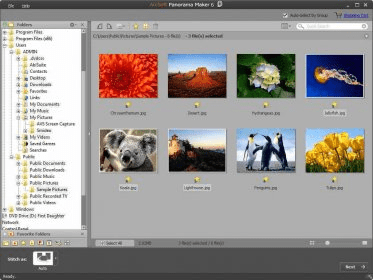
The interface is neat, with no complicated menus; as a matter of fact, the entire set of commands are found on the main window; they are not hidden in drop-down menus, but remain displayed on the working board the whole time.
To get a panoramic effect out of your photos, you need to select pictures with the same pixel size; otherwise, the photos can't be stitched. However, you don't need to check manually the photos' properties; the program automatically scans the selected files and informs you whether they can all be joined or some must be removed. Then, all it takes is choose one of the five available stitching styles and define the thumbnails order within the resulting panoramic image. If you consider necessary, you can make a series of adjustments, such as crop area for the final picture, modify the inclination angle to enhance the panoramic effect, as well as adjust brightness and contrast parameters for a plain appearance. The last step is to frame the picture, insert a title or a message, and the project is ready to be saved to your computer or sent directly to a printer.
The same procedure is available with video files. While viewing the recording, you simply click 'Stitch' and the program finds the perfect frames for achieving a panoramic image. Once the process is over, you can preview the result to see whether it reaches your expectations.
To sum up, this is an application for creating panoramas by means of joining image files and video frames. Besides this main attribute, ArcSoft Panorama Maker also acts as a photo and a video file organizer and manager. You can easily browse for files and folders, add the best images and recordings to a 'Favorite' category, rate and tag your savings for easily find them later.






Comments (8)
Every time you start, the program says: "The program will close because of errors".
ArcSoft should not even have requirement to make an advertisement, a real shame to not work, That caused frustration.
Please: If possible send information on this really insane problem. [email protected]
It's a very good program. I like it very much and using this for a long time.